Runs Out

Everything that
expires, in one place.

Warranty & document expiry

Add the thing and the date. Runs Out reminds you well before it expires, while you can still do something about it.

iPhone & iPad · iOS 18+ One-time purchase 15 languages

Download on the App Store

Open it and start · Your device, your iCloud · No analytics, ever

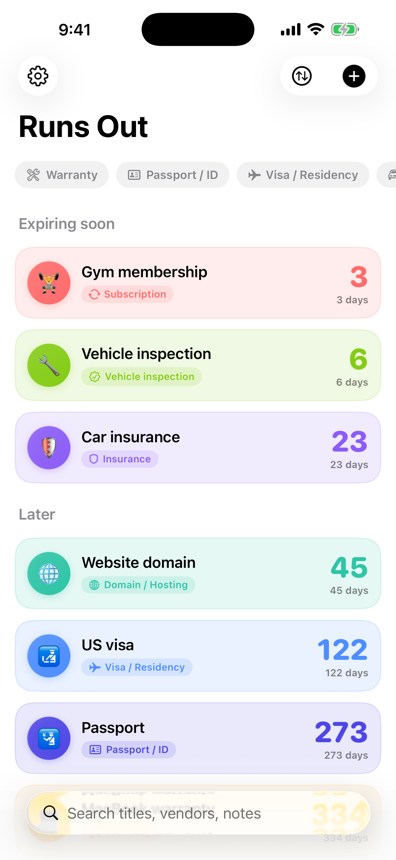
The Runs Out home list, showing items grouped by how soon they expire
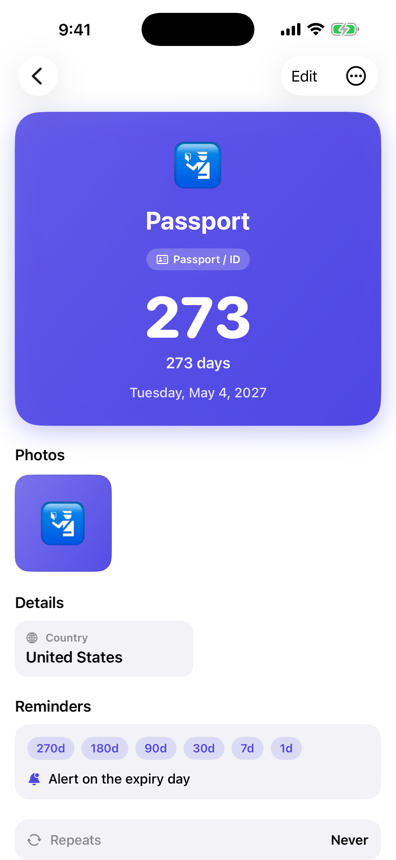
A passport in Runs Out: 273 days left, with reminders at 270, 180, 90, 30, 7 and 1 days
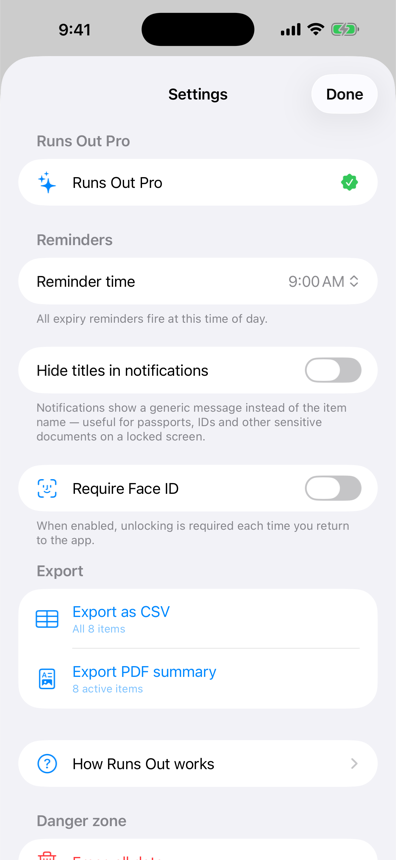
Runs Out settings: reminder time, hide titles in notifications, Face ID lock

What it does

A quiet list of dates that
speaks up before they matter.

Ten categories, from the passport in your drawer to the domain renewal you forgot you owned. Type a title and Runs Out guesses the category for you.

🛂

Documents that take months

Passports, visas, driving licences and residence permits. These are the ones where finding out late costs you a trip. Runs Out can also count down to the date a passport actually stops being accepted, which is often months before the date printed on it.

🧾

Warranties worth claiming

Keep the receipt with the item. Photograph it, or scan it with the document scanner, and the proof is there when you need it.

🔁

Things that renew

Insurance, inspections, subscriptions and domains. Mark them as repeating and they roll forward the moment they lapse.

The Runs Out home list, showing items grouped by how soon they expire

See it comingGrouped by urgency, colour-coded by category.

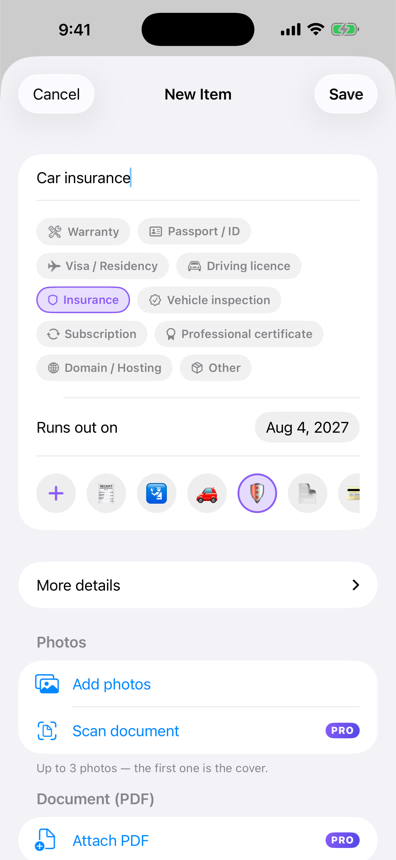
Adding an item: title, category chips, expiry date, emoji, photos and PDF

Twenty seconds to addType a title; the category picks itself.

A passport in Runs Out: 273 days left, with reminders at 270, 180, 90, 30, 7 and 1 days

Know exactly how longEvery reminder, visible at a glance.

Reminders

It knows the difference between
a passport and a warranty.

Renewing a passport takes months. Claiming a warranty takes an afternoon. They should not warn you at the same time, so they don't. Every category arrives with its own schedule, and you can override any of it.

🛂 Passport / ID270 days180903071on the day
🛃 Visa / Residency90 days60301471on the day
🎓 Professional certificate180 days90307on the day
🛡️ Insurance60 days301471on the day
🔧 Vehicle inspection60 days141on the day
🧾 Warranty30 days7on the day
🔁 Subscription30 days71on the day

Reminders arrive at 9:00 by default. Change it once in Settings and every item follows. They are created and delivered entirely on your device.

Privacy

Your passport scans are
nobody else's business.

This app stores photographs of identity documents and receipts. That is exactly why it was built with nowhere for them to go.

Straight inOpen the app and start adding. That is the whole of the onboarding.
Your device, your iCloudYour items live on your device and sync through your own iCloud, if you want them to.
Apple frameworks onlyThe app ships without a single third-party library: no analytics, no advertising, no trackers.
Discreet notificationsReference and serial numbers never appear in a notification, and titles can be hidden on the Lock Screen.
Face ID lockOptional, free, and off until you turn it on.
Works offlineEverything except iCloud sync works offline.

Free & Pro

Buy it once. That's the
whole business model.

A single purchase, not a subscription. Pro unlocks on every device signed in to the same Apple Account.

Free

Up to 5 items

  • All ten categories
  • The smart reminder schedules
  • Photos and repeats
  • Private iCloud sync
  • Face ID lock
  • Every widget size
  • Siri and Shortcuts
  • Mirror to your calendar
PRO

Runs Out Pro

One-time purchase · yours forever

  • Unlimited items
  • CSV and PDF export
  • PDF attachments
  • A scanner that reads the date
  • Custom reminder schedules
  • Share an item with a code

Questions

The things people ask first.

Do I need an account?

No. Open the app and start adding things. There is no sign-up, no email, no password.

Where is my data kept?

On your device. If you leave iCloud sync on, it also travels through your own private iCloud database so your iPhone and iPad stay in step. That is Apple's storage, tied to your Apple Account, not ours.

We have no servers of our own, so there is nowhere else for it to be. The exception is a share code you create yourself, which puts an encrypted copy of that one item in the app's iCloud container for up to 14 days.

How do the reminders work?

Every category has its own schedule. A passport starts warning you 270 days out because renewing one takes months; a warranty waits until 30 days out because claiming one takes an afternoon. You can set your own schedule on any item with Pro.

Reminders are local notifications, created and delivered on your device at the time you choose.

What happens after five items?

Nothing you already added stops working. The sixth item asks you to unlock Pro, which is a single purchase, not a subscription.

Does it read my receipts automatically?

Yes. Photograph or scan a receipt, a policy or a passport's data page (or attach the PDF), and Runs Out reads the dates it finds and offers you the one that looks like the expiry, including the machine-readable strip along the bottom of a passport, where the check digit confirms the reading. It proposes, it does not decide: the date arrives pre-filled in the form and you confirm it before anything is saved, and if nothing on the document is convincing the app says so and you type the date as before. All of that reading happens on your device. The image never leaves it.

Can I get my data out?

Yes. Pro exports everything to CSV (every field, ready for a spreadsheet) and a tidy PDF summary you can print or share.

Does it work offline?

Completely. The only thing that needs a connection is iCloud sync, and it catches up whenever you are back online.

Can I send an item to someone?

Yes, with Pro. Share turns one item into a twelve-character code you can text to someone; they type it into Runs Out and get their own copy. The copy is encrypted with the code itself, so nobody else can read it, us included. Photos and PDFs are never included, the reference number only if you say so, and the code stops working after 14 days or the moment you tap Stop sharing.

Something not working?

Write to a human. Include your device and iOS version and you will get a real reply.

jyl.iosapp@gmail.com